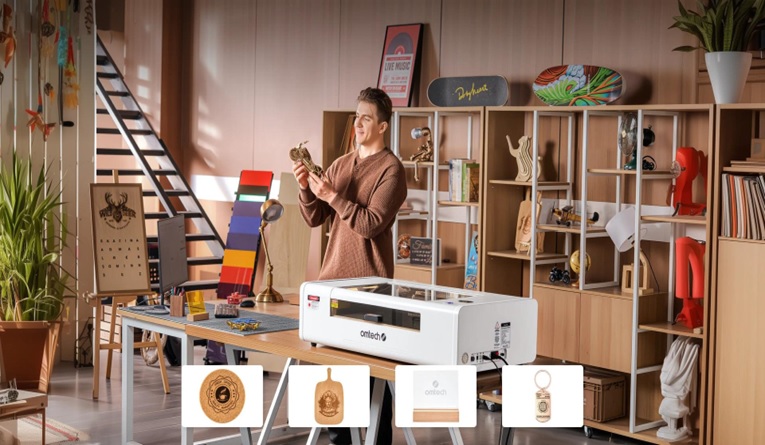
In the modern STEM, design, and shop classroom, few tools generate as much student excitement as a laser cutter. From turning 2D vector drawings into intricate 3D architectural models to creating custom school signage and engineering prototypes, the educational possibilities are boundless.
However, behind every smoothly running school makerspace or fablab is a teacher who likely learned some hard lessons along the way. Buying a laser cutter for an educational institution in Canada is vastly different from buying one for a home garage or a commercial factory.
If you are currently evaluating laser cutters for your school—whether funding it through provincial grants, school division budgets, or specialized tech-education allocations—here are the critical insights experienced Canadian educators wish they had known before signing the purchase order.
1. Safety is Not Just a Feature—It Dictates Provincial OHS Compliance
In a home workshop, a small error means ruined material. In a Canadian school, a safety oversight can compromise student well-being and trigger strict Provincial Occupational Health and Safety (OHS) audits (such as WorkSafeBC, Ontario Ministry of Labour, or CNESST in Quebec), leading to an immediate shutdown of your lab.
Many teachers initially look at affordable desktop diode lasers, only to realize too late that their open-frame designs are a massive liability in a room full of inquisitive students.
- What is strictly required: Canadian schools require a Class 1 laser safety rating. This means the laser operates inside a fully enclosed, light-tight housing. Furthermore, the machine must feature mechanical safety interlock switches that instantly kill the laser beam the moment the lid is opened during operation.
- The Institutional Choice: Systems like the OMTech Polar or the Pronto Series are engineered with these exact school board safety protocols built-in, providing total peace of mind for educators supervising up to 30 students at once.
2. Fume Extraction is Half the Battle (Indoor Air Quality is Strict)
When a laser cuts organic materials like plywood, acrylic, or leather, it isn’t actually “cutting”—it is vaporizing the material using extreme thermal energy. This process generates dense smoke, ultra-fine particulates, and volatile organic compounds (VOCs), including hazardous gases like formaldehyde when cutting plastics.
A common regret among STEM coordinators is buying a powerful laser but underestimating the exhaust system, resulting in a classroom that smells like a campfire and triggers school smoke alarms.
- The Canadian Reality: Simply sticking a flexible plastic duct out of a slightly opened classroom window is rarely permitted by school board facility managers, and during Canadian winters, it ruins the building’s climate control.
- The Solution: Budget for a dedicated, multi-stage fume extractor. A true laser filteranlage / filtration unit (like the OMTech XL series) uses a three-stage system: a pre-filter for heavy wood dust, a HEPA filter for microscopic hazardous particles, and a massive activated carbon bed to completely neutralize odors. This allows for safe, eco-friendly indoor recirculation without losing heated air during cold winter months.
3. Avoid Contentious Cloud Software and Ongoing Student Fees
Many educational technology brands lock schools into proprietary, cloud-based software ecosystems. While this sounds convenient on paper, it frequently turns into an IT department’s worst nightmare. Cloud software often requires expensive ongoing per-student subscription fees, requires a flawless internet connection to function, and frequently gets blocked by strict school network firewalls or provincial student privacy regulations (like FIPPA/FOIP).
- The Teacher’s Preference: Experienced Canadian educators overwhelmingly prefer LightBurn. It is a locally installed, platform-independent application (running flawlessly on Windows and macOS) that operates entirely offline.
- The Long-Term Win: LightBurn uses a transparent, perpetual educational license model—no recurring monthly fees. Teachers can teach vector design offline, save .svg or .dxf files to a USB drive, and run the laser seamlessly even if the school’s Wi-Fi goes down.
4. Material Versatility Dictates Classroom Engagement
A laser cutter that can only engrave cardboard will quickly lose its charm for high school design, engineering, or woodworking classes. To keep students engaged in real-world problem solving, the machine needs to handle structurally sound materials.
- Diode vs. CO2: While budget diode lasers can slowly engrave wood, they struggle to cut through thicker materials and completely fail when trying to cut clear, white, or blue acrylic due to the physics of light wavelengths.
- The CO2 Advantage: A 50W to 60W CO2 laser cutter is the sweet spot for Canadian schools. It easily slices through 6mm to 10mm (1/4″ to 3/8″) plywood, MDF, and cast acrylic in a single pass, enabling students to build functional engineering prototypes, drone frames, and high-quality artistic displays with perfectly clean, flame-polished edges.
5. Local Support and Rapid Parts Delivery Mean Zero Downtime
In a school environment, a machine that is down for three weeks waiting for a replacement lens or a tech support call from overseas is a disaster for lesson planning and term evaluation deadlines. Laser cutters have consumable parts—mirrors, focal lenses, and the laser tube itself will eventually need maintenance under heavy classroom use.
- Before You Buy: Ensure your vendor has robust technical support and inventory easily shippable to Canada. Ask for clear, comprehensive technical documentation and video guides so that your school division’s IT technicians or shop maintenance staff can easily handle routine optical alignments and upkeep without lengthy delays.
Conclusion and Next Steps for Canadian School Boards
Introducing a laser cutter to your curriculum doesn’t have to be a trial-by-fire experience. By prioritizing enclosed Class 1 safety, robust multi-stage filtration, and reliable support over gimmicky cloud features, you can build a highly successful STEM space that lasts for years.


